Design Custom Mugs with a 15oz Mug Template and SVG Cut File
Transforming Your Mug Design Workflow
Creating professional-looking custom mugs doesn't require expensive equipment or years of experience. A well-designed 15oz Mug Template paired with a Mug SVG Cut File gives you a foundation that works across multiple design platforms and production methods. Whether you're running a small business, creating personalized gifts, or building a product line for an online store, having the right template saves hours of trial and error.
The 15oz mug has become a standard in the custom drinkware market. It's large enough to showcase detailed artwork, photographs, and typography without feeling cramped. When you work with a template sized specifically for 8.5"x11" sheets, you're working within the constraints of home printers and standard sublimation paper—making the entire process accessible from your kitchen table or home office.
What Makes This Template System Work
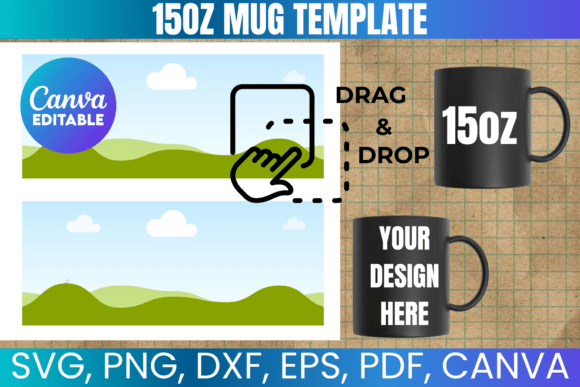
The real value lies in the file variety included with this 15oz Mug Template download. You receive SVG files for Cricut and Silhouette machines, PNG files with transparent backgrounds for layering in Photoshop or Canva, DXF files for Silhouette Studio compatibility, and PDF files with solid backgrounds for straightforward printing. The Canva template link rounds out the package, allowing drag-and-drop editing for anyone who prefers browser-based design tools.
Each format serves a specific purpose in the production pipeline. The SVG file maintains crisp vector edges regardless of scaling, which matters when you're cutting vinyl wraps or creating precise sublimation transfers. The PNG file with transparency works beautifully when you need to overlay your mug design onto mockup images for product listings or social media graphics. The PDF gives you a reliable print-ready option that preserves your design exactly as intended.
Compatibility Across Design Software
This Mug SVG Cut File works with virtually every major design platform. Cricut Design Space users can import the SVG directly for cutting projects. Silhouette Studio handles the DXF file natively. Adobe Photoshop and CorelDraw professionals can work with the PNG or PDF formats depending on their workflow preferences. Even free tools like Inkscape open the SVG file without issues.
The Canva template deserves special attention here. For entrepreneurs and content creators who aren't deep into professional design software, Canva removes the technical barrier entirely. You can add your artwork, adjust colors, incorporate text, and generate a print-ready file in minutes. This accessibility makes the 15oz Mug Template valuable for teams where multiple people might need to create designs without specialized training.
Practical Applications for Real Projects
Small business owners frequently use these templates to develop branded merchandise without hiring a designer for every variation. A coffee shop owner might create seasonal designs, a photographer could offer client appreciation gifts, or a blogger might develop a product line that extends their brand identity into physical goods. The template handles the technical specifications—wrap dimensions, bleed areas, print zones—while you focus on creative direction.
Sublimation printing pairs particularly well with this setup. The 8.5"x11" sizing means you can print your design on standard sublimation paper using a converted inkjet printer. The full wrap design covers the mug surface completely, giving you maximum creative real estate. Whether you're working with photographic imagery, hand-lettered quotes, pattern designs, or logo-based artwork, the template ensures proper coverage and alignment.
From Concept to Finished Product
The workflow typically follows a straightforward path. Import the template into your preferred design software. Add your artwork within the designated areas, keeping important elements away from edges where the wrap meets. Print the design on sublimation paper or cut your material using the SVG cut file. Apply to the mug using a heat press or mug press according to your equipment specifications.
One practical consideration worth noting: Cricut users may need to manually adjust sizing after importing the SVG file. Design Space occasionally scales imported files, so verifying dimensions before cutting prevents wasted materials. This small step becomes second nature after your first project.
Building a Product Line with Consistency
Consistency matters when you're building a brand around custom products. Using the same 15oz Mug Template across your entire collection ensures that every design wraps correctly, every print lands in the right position, and every finished mug looks professionally produced. Customers notice when products look polished—it builds trust and encourages repeat purchases.
The template approach also streamlines production when you're fulfilling orders. Instead of measuring and adjusting for each new design, you simply swap artwork within the established template structure. This efficiency becomes increasingly valuable as your order volume grows. What starts as a weekend hobby can scale into a legitimate revenue stream when your production process is built on reliable design assets.
For personal use, the same principles apply. Creating a set of matching mugs for a wedding, family reunion, or holiday gift feels far less daunting when the technical groundwork is already handled. You invest your energy in the creative elements—choosing colors, selecting fonts, arranging imagery—rather than wrestling with measurements and file formats.
Understanding Usage Rights and Licensing
This template includes both personal and commercial use rights for creating physical products. You can sell finished mugs featuring designs created with this template without additional licensing fees. However, the digital files themselves cannot be resold, shared, or redistributed. This distinction protects the template creator's work while giving you full freedom to monetize your physical products.
Think of it as purchasing a tool rather than purchasing content. A hammer lets you build furniture to sell, but you wouldn't resell the hammer itself as someone else's product. The 15oz Mug Template and Mug SVG Cut File function the same way—they're production tools that enable your creative and commercial work.
Getting Started Without Overthinking It
The biggest barrier to custom mug creation is usually the starting point. Having a professionally sized template eliminates the measurement guesswork, the file format confusion, and the compatibility concerns that stop many projects before they begin. Download the files, open them in your preferred software, and start designing.
If questions arise during your process, reaching out for support makes sense. Template creators who offer assistance understand that their success depends on your success with their product. Don't hesitate to ask about specific software settings, production techniques, or design recommendations. The DIY community thrives on shared knowledge, and most creators are genuinely helpful when approached with specific questions.
Your first finished mug might not be perfect, and that's completely normal. Each project teaches you something about color management, heat press timing, design placement, or material selection. The template gives you a reliable starting point so those lessons come from creative experimentation rather than technical failures. Start with a simple design, learn the process, and build complexity as your confidence grows.