Teacher Apple Canva Frame Template for Educators
There is a specific kind of warmth that washes over a classroom when you combine the nostalgia of a crisp red apple with the sleek, modern capabilities of digital design. For educators, tutors, and school administrators, the challenge isn't a lack of creativity; it is a lack of time. You need professional-grade visuals for newsletters, student awards, and social media updates, but you don't have the bandwidth to start from scratch every single time. This is where the Teacher Apple Canva Frame Template steps in, bridging the gap between a busy schedule and a polished, professional brand identity.
When you download this package, you will receive a zip file containing a PDF. Inside that PDF is a direct link to access the templates. It is a streamlined process designed to get you designing immediately rather than troubleshooting files. Once you click the link, you gain access to four distinct templates, each built on a generous 4000x4000 px canvas. This isn't just a small graphic; it is a substantial design asset that allows for high-resolution output, whether you are printing a poster for the hallway or posting a crisp graphic to Instagram.
The Anatomy of a Versatile Digital Asset
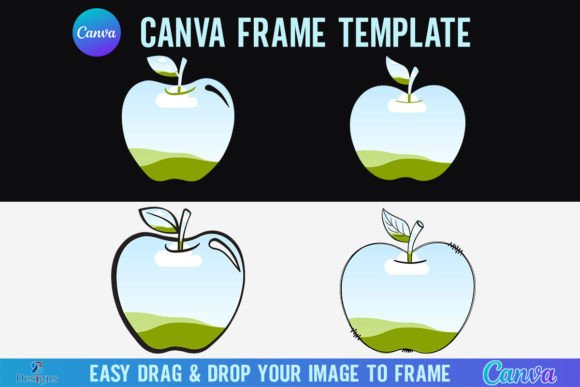
Understanding the visual personality of this template is key to using it effectively. The "Teacher Apple" motif is a universal symbol of education, knowledge, and care. However, in the context of modern typography and layout, it functions as a sophisticated frame. It acts as a container, guiding the viewer's eye to the content you place inside. The style leans towards a clean, vector-based aesthetic, ensuring that the lines remain sharp regardless of how much you zoom in.
The appeal of this specific Canva Frame Template lies in its adaptability. It avoids the trap of looking overly childish, which is vital if you are a high school teacher, a university lecturer, or an educational business owner. Instead, it strikes a balance between playful and professional. The visual characteristics are designed to support your content rather than overwhelm it. By utilizing the drag-and-drop functionality of Canva, you can easily slot in PNG or JPG background images. Imagine placing a photo of a recent field trip, a texture of notebook paper, or a solid brand color inside the apple shape. The template handles the masking, so you don't have to worry about complex clipping paths or layer masks.
Practical Applications for Educators and Creatives
When we look at editorial design and educational marketing, consistency is the holy grail. Using the Teacher Apple Canva Frame Template allows you to create a cohesive visual language across multiple platforms. Here is how different professionals can leverage this creative font and frame asset:
- Social Media Graphics: For tutors or small business owners selling educational resources, Instagram and Pinterest are vital. Use the frame to create a recurring "Teacher Tip Tuesday" series. The recognizable apple shape becomes a visual anchor for your audience, improving recognition and engagement.
- Classroom Decor: Print design is still massive in education. Because the canvas is 4000x4000 pixels, you have the resolution necessary to print high-quality posters, desk name tags, or "Student of the Week" awards. The visual hierarchy is already established for you; you just need to add the student's name and the background image.
- Packaging Design: If you are a crafter or a small business owner selling teacher planners, stickers, or classroom supplies, this frame works beautifully for packaging design mockups. It adds an instant thematic element that signals "education" without needing a word of explanation.
- Digital Newsletters: Parents often skim emails. Using a distinct visual frame helps break up text walls. Placing a photo of the week inside the apple frame creates a focal point that increases readability and keeps parents engaged with the content.
Optimizing Your Workflow with Canva
The efficiency of this tool cannot be overstated. In the past, creating a custom frame required software like Adobe Illustrator and a working knowledge of vector paths. Now, the workflow is democratized. You will need a free Canva account to open and edit the template, which removes the barrier to entry for hobbyists and new teachers.
However, it is important to note the technical specifications regarding transparency. If your goal is to use the apple shape as a sticker—perhaps for digital planning or to layer over a complex background—you will need to download the file with a transparent background. This feature requires a Canva Pro version or higher. For standard use, such as placing the apple on a white page or a colored background, the free version works perfectly.
The "drag and drop" mechanic is where the magic happens. You don't need to be a graphic designer to achieve a professional result. Simply upload your PNG or JPG, and drop it into the frame. Canva automatically masks the image to fit the apple contour. This allows for rapid prototyping. You can swap out a photo of a science experiment for a photo of a library in seconds, maintaining the same stylistic integrity across your entire project.
Design Strategy: Hierarchy and Readability
A common mistake in educational design is clutter. When you have a strong graphic element like an apple frame, you need to ensure it supports readability. The frame draws the eye, so use that to your advantage. Place your most critical information—such as the date of a parent-teacher conference or a deadline for a project—inside or immediately adjacent to the frame.
Think about font pairing. Since the frame has a distinct shape, the text surrounding it should complement, not compete. If the frame feels playful, you might pair it with a clean sans serif font for the body text to ensure legibility. Conversely, if you are using the frame for a formal certificate, a traditional serif font can add a sense of gravity and prestige. The template acts as the visual anchor, allowing your typography choices to breathe.
Important Usage Notes
It is vital to manage expectations regarding the file format. This is a digital product. No physical frames will be shipped to you. You are purchasing a license to use a Canva Frame Template. Furthermore, this file is specific to the Canva ecosystem. It is not an SVG file, and therefore, it is not suitable for use with Cricut Design Space or Silhouette cutting machines. If you are a crafter looking to cut physical vinyl shapes for a bulletin board, this specific digital file will not translate to your machine's software. However, for digital screen use, web design, and standard print methods (inkjet or laser), it is an ideal solution.
Elevating Your Educational Brand
Ultimately, tools like the Teacher Apple Canva Frame Template are about professionalizing the education sector. Whether you are a private tutor building a client base or a teacher organizing a classroom, visual consistency builds trust. By using a high-quality, pre-designed frame, you signal to parents and students that you are organized, attentive to detail, and invested in your environment.
This template removes the friction from the creative process. It allows you to focus on the message—the lesson, the announcement, the celebration—while the frame handles the aesthetic heavy lifting. It is a small investment in time that yields significant returns in clarity, engagement, and visual appeal. Drag, drop, and watch your educational materials transform from standard to standout.