Designing the Perfect Surprise: Boarding Pass Canva Template Guide
There’s a unique kind of magic in the tangible details of travel. The weight of a suitcase handle, the hum of an airport terminal, and most importantly, the crisp edge of a boarding pass. It’s a small piece of paper that represents a massive promise: adventure. Now, imagine capturing that exact feeling and using it to announce a surprise trip, celebrate a milestone, or brand a travel-themed event. The Boarding Pass Canva Template is a versatile design asset created to bridge the gap between a digital concept and a physical keepsake, offering a fully editable canvas for your most creative ideas.
The Anatomy of a Convincing Ticket Design
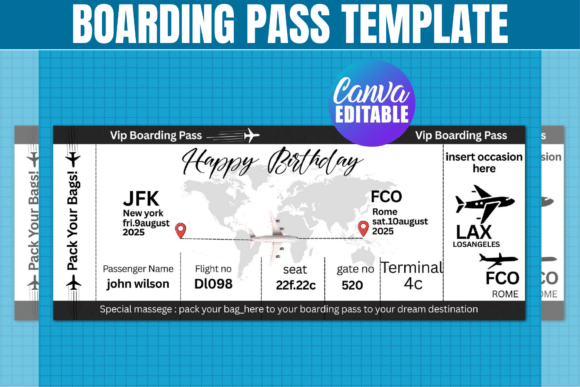
A successful airline ticket design relies on more than just slapping text onto a striped background. It requires an understanding of information hierarchy and visual authenticity. This particular template package is designed with a modern aesthetic that mimics high-end travel documentation. The layout typically features a clean sans serif font for the critical data—flight numbers, seat assignments, and destinations—ensuring immediate readability. This is often balanced with a stylized header or "airline" name that might utilize a script font or a bold display font to establish personality.
The visual appeal lies in the details: the perforated tear-off section, the barcode graphics, and the structured grid system that organizes the passenger's journey. By providing the design in multiple formats—SVG for precision cutting, PNG for digital overlays, and PDF for standard printing—the template ensures that the final output retains the professional integrity of a real ticket. It’s not just a picture of a ticket; it’s a structural blueprint for a DIY digital ticket that feels authentic in the hand.
Strategic Applications: Beyond the Surprise Trip
While the most obvious use case is a surprise trip boarding pass for a loved one, the utility of this template extends far into professional and commercial realms. For marketers and brand strategists, this design asset is a goldmine for experiential marketing. Imagine a travel agency sending out "save the date" invitations for a client event using a physical, custom-printed ticket. It immediately elevates the perceived value of the event.
Small business owners, particularly those in the travel or hospitality niche, can leverage this template for loyalty programs or raffle prizes. A "ticket" serves as a powerful psychological trigger associated with reward and escape. For content creators and bloggers, the template is perfect for flat-lay photography or unboxing videos, providing a realistic prop that adds context to travel gear reviews or packing tutorials. Even for internal corporate use, a "boarding pass" can be a creative way to announce a company retreat or a new employee's "onboarding" journey.
Customization and Brand Identity in Canva
The inclusion of a direct Canva link transforms this from a static image into a dynamic design asset. Canva’s intuitive interface allows users to manipulate every element of the ticket to align with a specific brand identity. If you are a designer working for a client, you can easily swap out the generic typography for a specific premium font that matches their style guide. Perhaps the client leans towards a vintage aesthetic; you could replace the modern sans-serif with a serif font to evoke the golden age of air travel.
The color palette is equally flexible. You are not locked into the standard blue and red of commercial airlines. You can adapt the template to match wedding colors for a destination bachelorette party, or corporate colors for a product launch. The ability to edit the text fields allows for creative liberty—changing "Passenger Name" to "VIP Guest" or "Boarding Time" to "Cocktail Hour." This level of customization ensures that the final product isn't just a generic ticket, but a cohesive piece of communication that speaks directly to the recipient.
Technical Execution: From Screen to Print
Transitioning from a digital file to a physical object is where many DIY projects falter, but the structure of this package mitigates common issues. The files are formatted for standard 8.5" x 11" sheets, making them accessible for home printing or standard office supply store services.
For those using cutting machines like a Cricut or Silhouette, the inclusion of SVG and DXF files is crucial. These vector formats allow the machine to trace the perforated lines or the ticket outline with mathematical precision, rather than relying on pixel-based detection. This is particularly useful if you want to die-cut the ticket into its classic shape rather than cutting it by hand with scissors. However, it is worth noting that Cricut users may need to adjust template dimensions slightly depending on their specific mat size and software version, a standard practice in the world of digital crafting.
Typography and Readability Considerations
When finalizing your airline ticket designs, pay close attention to typography. A boarding pass is a dense information environment. If you choose to introduce a handwritten font for the passenger's name to give it a personal touch, ensure it remains legible at smaller sizes. Avoid overly decorative fonts for the "fine print" details like terminal numbers or boarding groups; a clean, geometric sans serif font is almost always the best choice for data-heavy sections.
Consider the hierarchy: The destination should likely be the boldest element, perhaps using a modern typography style with wide kerning, while the departure city can be smaller. This visual hierarchy guides the eye naturally from the "Where" to the "When." If you are creating these for a commercial font or design service to sell as physical prints, always print a test sheet. Screen colors often differ from inkjet or laser output, and you want to ensure the barcode (if decorative) looks crisp and the contrast between the text and background is high enough for easy reading.
Finalizing Your Project
The Boarding Pass Canva Template is more than just a novelty; it is a multi-functional tool for storytelling and engagement. Whether you are a crafter building a scrapbook of memories, a publisher creating promotional materials for a travel magazine, or a marketer looking for a unique direct-mail piece, this asset provides the foundation. By combining the ease of Canva editing with the precision of SVG/DXF files, you have the freedom to create something that feels genuinely special. It’s an invitation to think outside the standard envelope and deliver a message that feels like a departure to somewhere new.