13 Photobooth Template Bundle: Editable Canva Frames for Events
Creating a memorable experience at a wedding, corporate gathering, or milestone birthday often comes down to the small details. The 13 Photobooth Template Bundle is designed to bridge the gap between professional design software and the accessibility of Canva, allowing you to produce high-quality photo keepsakes without needing advanced technical skills. This collection focuses on utility and versatility, offering a set of blank templates that serve as a foundation for your creativity.
Understanding the 13 Photobooth Template Bundle
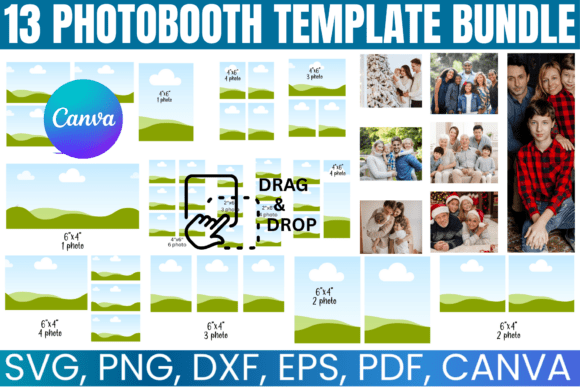
At its core, this bundle is a toolkit for event planners, DIY enthusiasts, and small business owners. The visual style of the included frames is intentionally minimal yet sophisticated. Because the templates are "blank," they act as a neutral canvas. You won't find cluttered designs that fight for attention against your photos. Instead, the appeal lies in clean lines and standard dimensions—specifically formatted for 4x6 prints and photo strips. This minimalist approach ensures that the templates can adapt to any event theme, whether it is a rustic barn wedding or a sleek corporate gala.
The bundle includes 13 distinct designs, providing enough variety to keep guests engaged throughout the night without overwhelming the host with too many choices. The aesthetic is versatile, meaning it relies on your customization to bring it to life. By offering a "blank" slate, the bundle places the focus squarely on the typography and imagery you choose to add, making it an excellent exercise in visual hierarchy.
Practical Applications and Project Fit
One of the most significant advantages of the 13 Photobooth Template Bundle is its cross-platform compatibility. In the modern design landscape, flexibility is a premium asset. The package includes SVG, PNG, DXF, and PDF files, which covers nearly every major design and cutting software on the market.
For those using cutting machines like Cricut or Silhouette, the SVG and DXF files allow for precision cutting. Imagine creating custom photo booth props or frames where the physical cutout matches the digital design perfectly. For the majority of users, however, the Canva link is the star feature. Canva has democratized modern typography and layout design, and this bundle leverages that platform to allow for "drag-and-drop" editing.
Where These Templates Excel
- Wedding Photo Booths: The 4x6 format is the industry standard for photo prints. You can easily overlay the couple's names, the date, and a custom monogram. This transforms a simple photo into a piece of editorial design that guests will want to keep.
- Corporate Branding: For businesses hosting launch parties or trade shows, these templates are invaluable. You can incorporate your brand identity—specifically your logo design and color palette—directly onto the photo strip. This ensures that when guests share their photos on social media, your branding is front and center.
- Social Media Graphics: Beyond the physical print, these templates work beautifully as digital overlays for social media graphics. If you are a content creator or blogger, you can use the transparent PNG files to frame Instagram posts or Stories, creating a cohesive visual feed.
- Packaging and Merch: Small business owners can repurpose these frames for packaging design. A 4x6 frame can easily become a hang-tag for products or a thank-you card insert, adding a professional touch to your unboxing experience.
Design Strategy and Typography Integration
While the templates provide the structure, the typography you pair with them determines the final impact. This is where your knowledge of font pairing comes into play. Because the frames are blank, you have the freedom to choose a premium font that matches your event's mood.
For a romantic wedding, you might pair a flowing script font for the names with a clean sans serif font for the date and location. This contrast creates a visual hierarchy that guides the viewer's eye from the most important information to the supporting details. Conversely, for a modern corporate event, you might stick to a bold display font paired with a geometric sans-serif to convey authority and clarity.
The bundle encourages you to think about readability. When adding text to a photo strip, legibility is paramount. The templates are designed with ample "negative space" or areas where text can be placed without obscuring the subjects in the photo. This is a crucial aspect of web design and print design—ensuring that the content is accessible and easy to digest.
Technical Execution and Workflow
The "How It Works" section of this bundle highlights a streamlined workflow that respects your time. The instant download feature means you can start designing immediately. This is particularly useful for last-minute event planning or for designers working with tight client deadlines.
Once you open the Canva link, the editing process is intuitive. You can upload your own photos directly into the frames, adjust the colors to match your theme, and manipulate the text layers. This flexibility allows for rapid prototyping. You can create ten different variations of a photo strip in minutes, allowing you to test different color combinations and layout adjustments before committing to a final print run.
For those utilizing cutting software, the inclusion of multiple file formats (SVG, DXF) ensures that the lines remain crisp regardless of how much you scale the design. This vector-based approach is essential for high-quality output, preventing the pixelation that often plagues raster-based designs when printed.
Maximizing the Value of Your Investment
Treating the 13 Photobooth Template Bundle merely as "wedding templates" limits its potential. View these assets as foundational design assets for a broader creative strategy.
For example, a photographer could use these templates to create a consistent look across their portfolio presentations. By applying the same frame style to client proofs, you reinforce your professional brand. Similarly, a blogger could use the collage overlays to create mood boards or "life lately" posts that feel curated and intentional.
The key to getting the most out of this bundle is experimentation. Don't be afraid to layer the elements. Use the transparent PNG overlays on top of the solid PDF backgrounds to create depth. Mix and match elements from different templates within the bundle to create a custom design that is uniquely yours.
Final Considerations for Professional Use
When preparing files for print, always ensure your resolution is set to 300 DPI. While Canva handles much of this automatically when downloading as a PDF Print, it is good practice to double-check your export settings. The 13 Photobooth Template Bundle is formatted for standard 8.5"x11" sheets, which means you can fit multiple 4x6 designs on a single page, optimizing your paper usage and reducing costs if you are printing at home.
Ultimately, this bundle is about empowerment. It removes the technical barriers to entry for high-quality event design. Whether you are a seasoned graphic designer looking for a quick layout solution or a DIY bride trying to save on stationery costs, these templates provide the structure and flexibility needed to produce professional-grade results. By combining these frames with thoughtful typography and high-resolution photography, you can create keepsakes that last a lifetime.