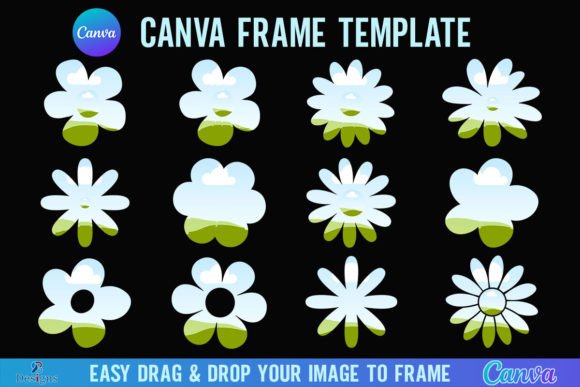
Retro Charm Meets Modern Design: The Daisy Flower Canva Frame Template
There’s something undeniably magnetic about retro design. It carries a sense of nostalgia, warmth, and character that instantly connects with audiences on an emotional level. The Daisy Flower Canva Frame Template Retro taps directly into that appeal, offering designers, marketers, and creative professionals a versatile set of frame templates that blend vintage aesthetics with contemporary usability. Whether you’re building a brand identity, crafting social media graphics, or developing packaging design concepts, this template collection provides a practical foundation for projects that need personality without sacrificing professionalism.
What Exactly Is This Template Collection?
When you purchase the Daisy Flower Canva Frame Template Retro, you receive a single zip file containing one PDF document. Inside that PDF, you’ll find a direct link granting access to twelve distinct Canva frame templates. Each frame features daisy-inspired floral motifs rendered in a retro visual style—think soft, rounded petals, hand-drawn linework, and color palettes that evoke mid-century illustration or 1970s botanical prints. The paper size is set at 4000x4000 pixels, which gives you substantial working space for both digital and print applications.
The workflow is straightforward. After unzipping the file and clicking the link, you open the templates inside Canva. From there, you simply drag and drop any PNG or JPG background image into the frame to fill it. The process requires no advanced technical skills, making it accessible for hobbyists and small business owners who may not have extensive experience with professional design software. That said, experienced designers will appreciate the clean structure and the creative flexibility these frames offer.
It’s worth noting that this is a digital product—no physical frames ship to your door. The templates function exclusively within Canva, and they are not SVG files. If you work with Cricut Design Space or Silhouette cutting machines, these frames won’t integrate directly into those workflows. However, for anyone using Canva as part of their design assets toolkit, the templates slot in seamlessly.
The Visual Personality Behind the Retro Daisy Aesthetic
Retro design isn’t a monolith. It encompasses everything from Art Deco geometry to psychedelic color bursts to the earthy, organic palettes of the 1970s. The Daisy Flower Canva Frame Template Retro leans into that last category with confidence. The floral elements feel handcrafted rather than digitally sterile. There’s a warmth in the linework that suggests illustration rather than vector automation, and that distinction matters when you’re trying to communicate authenticity through visual branding.
These frames work particularly well for projects where brand perception hinges on approachability and charm. A boutique bakery, a handmade soap company, a wellness blog, or a vintage-inspired fashion label—these are the kinds of brands where retro daisy frames reinforce the story you’re already telling. The visual style doesn’t compete with your content; it frames it, quite literally, in a way that adds context and emotional texture.
From a visual hierarchy standpoint, the frames serve as strong compositional anchors. They draw the eye inward, guiding viewers toward whatever image or text you place inside. This makes them especially useful for hero images on websites, featured posts on social media, or cover designs for digital publications. The retro personality doesn’t overwhelm—it complements.
Where These Templates Deliver the Most Value
Let’s talk practical applications. The Daisy Flower Canva Frame Template Retro shines across a surprisingly broad range of projects, and understanding where it fits best helps you make smarter design decisions.
Social media graphics represent one of the most immediate use cases. Instagram posts, Pinterest pins, Facebook headers, and promotional stories all benefit from framed imagery that stands out in crowded feeds. The retro daisy aesthetic cuts through the visual noise of minimalist, hyper-polished graphics that dominate most platforms. When everything looks sleek and corporate, a touch of vintage warmth becomes a differentiator.
Editorial design and publishing projects also benefit significantly. If you produce digital magazines, blog headers, e-book covers, or newsletter graphics, these frames add a layer of visual sophistication that elevates the reading experience. The 4000x4000 pixel resolution ensures your images remain crisp even when scaled for larger formats, which matters when you’re thinking about both screen and print quality.
Packaging design concepts and mockups gain personality when framed with retro floral elements. Even if you ultimately produce packaging through different software, using these Canva frames during the ideation and presentation phase helps clients and stakeholders visualize the final product with greater clarity. The retro style communicates craftsmanship and care—qualities that resonate with consumers who value handmade and artisan goods.
Logo design presentations, mood boards, and brand identity explorations benefit from having stylistic frames that contextualize visual concepts. When you’re pitching a retro-inspired brand direction to a client, surrounding your proposed color palette or typography samples with daisy frames reinforces the narrative without requiring additional illustration work.
Working Within Canva: Practical Considerations
You’ll need a free Canva account to access and edit these templates, which lowers the barrier to entry considerably. Most of the core functionality—dragging, dropping, resizing, and layering—works perfectly on the free tier. However, if your project requires exporting with a transparent background, you’ll need a Canva Pro subscription or higher. That’s an important detail to factor into your workflow planning, especially if you intend to composite the framed images into larger designs using other software.
The drag-and-drop mechanism is intuitive but deserves a moment of intentional practice. Choosing the right background image matters. A busy, high-contrast photograph placed inside a detailed retro frame can create visual clutter rather than harmony. Images with softer tones, simpler compositions, or intentional negative space tend to pair most effectively with the daisy motifs. Consider how the frame’s personality interacts with your image’s mood—both should speak the same visual language.
Font pairing is another consideration when building complete designs around these frames. Retro aesthetics pair naturally with script fonts, handwritten fonts, and certain serif fonts that carry organic, slightly imperfect characteristics. Avoid pairing these frames with ultra-modern sans serif fonts unless you’re intentionally creating contrast for a contemporary-retro hybrid look. The goal is cohesion—every element should feel like it belongs in the same visual conversation.
Making the Most of Your Design Assets
Treat the Daisy Flower Canva Frame Template Retro as one piece within a broader design strategy. The most effective creative professionals don’t rely on a single asset to carry an entire project. Instead, they build systems where frames, typefaces, color palettes, and imagery work together to create a consistent brand identity.
Test these frames across multiple contexts before committing them to a final campaign. Place them on your website alongside your existing web design elements. Drop them into a social media scheduling tool and preview how they look in a feed grid. Print a sample at your target size and evaluate the physical result. These small tests prevent costly revisions later and help you develop an intuitive sense for when retro framing enhances a project versus when it distracts.
The twelve included templates offer enough variety to avoid visual repetition across a campaign while maintaining stylistic consistency. Rotate them strategically—use one frame style for product features, another for testimonials, a third for behind-the-scenes content. This approach keeps your audience engaged without fragmenting your visual identity.
Ultimately, the value of any design asset lies not in what it is, but in how thoughtfully you apply it. The Daisy Flower Canva Frame Template Retro gives you a well-crafted starting point. What you build from there depends on your creativity, your understanding of your audience, and your willingness to experiment until the design feels right.