Custom Car License Plate Sublimation Template for Crafters
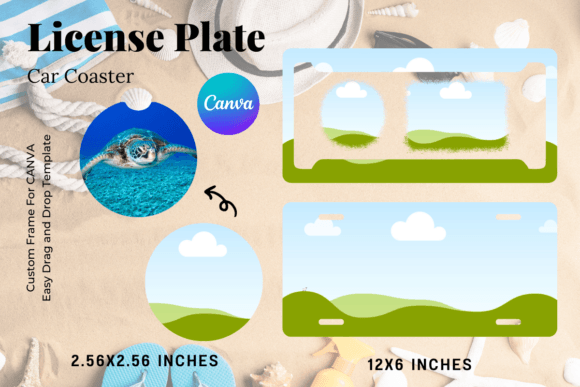
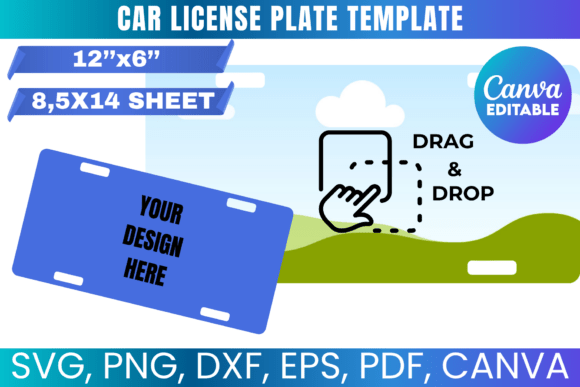
There is a specific kind of satisfaction that comes from designing a custom license plate. It is a small canvas, but it carries a lot of personality. Whether you are creating a vintage-style garage sign, a fun photo prop for a wedding, or a personalized gift for a car enthusiast, the foundation of that project starts with a reliable template. That is exactly where the Car License Plate Sublimation Template comes in. It is not just a blank outline; it is a properly scaled, vector-ready foundation designed to fit a standard 8.5" x 14" sheet of paper, ensuring your sublimation prints are crisp and correctly proportioned.
As someone who has wrestled with wonky dimensions and pixelated edges in the past, I appreciate the utility of a file set that just works. You are getting a toolkit here: SVGs for your Cricut or Silhouette, PNGs with transparent backgrounds for layering, and a Canva link for those who prefer a drag-and-drop workflow. This template bridges the gap between professional design software and accessible crafting tools. It allows you to focus on the creative aspect—the actual artwork, text, and branding—without worrying about whether the physical shape will cut correctly or if the aspect ratio will look distorted on a real plate.
The Anatomy of the Template: What You Are Actually Getting
When we talk about a sublimation template, we are talking about the structural integrity of your design. This particular Car License Plate Sublimation Template is designed with a modern, clean aesthetic in mind. It provides the standard rectangular boundary we are all familiar with, but with the precision required for digital cutting machines. The "personality" of this template is one of neutrality and adaptability. It acts as a blank slate, much like a high-quality sans serif font that can adapt to any branding voice.
The file formats included cover almost every scenario you might encounter in a design studio or home craft room:
- SVG and DXF Files: These are vector formats. If you are using a Cricut or Silhouette machine, these are your bread and butter. They allow the machine to cut the shape based on mathematical paths rather than pixels, meaning you can scale them up or down without losing quality. This is essential for creating clean edges on your sublimation paper or vinyl overlays.
- PNG with Transparent Background: This is perfect for layering in software like Adobe Photoshop or Procreate. You can drop your background texture or photo behind the plate shape and clip it perfectly, which is a standard workflow for complex sublimation designs.
- PDF with White Background: For those who want to print the template directly to use as a manual cutting guide or a sizing reference, the PDF is formatted for a legal-sized sheet (8.5" x 14"). This is particularly useful for packaging design mockups or physical proofs.
- Canva Link: This is a game-changer for accessibility. You do not need to own expensive software to use this template. If you have a Canva account, you can open the link and immediately start adding your graphics, text, and colors using their intuitive interface.
Practical Applications: Beyond the Garage Wall
While the obvious use case is creating custom plates for cars or trucks, the versatility of this design asset extends much further. Think about the visual language of "Americana" or "vintage automotive." That specific shape is iconic. Using this template allows you to tap into that visual shorthand for a variety of projects.
Branding and Logo Design
If you are working on a brand identity for an auto shop, a logistics company, or a classic car restoration business, this template is invaluable. You can use it to mock up how a logo looks on physical merchandise. It helps in testing the hierarchy of your design. Does the business name stand out? Is the phone number readable? By placing your logo design inside the template, you can evaluate the composition in a realistic context before sending anything to print.
Social Media and Marketing
For marketers and content creators, the license plate shape is a great frame for text overlays. Imagine a social media graphic where the "plate" holds a discount code or a witty slogan. It adds a tactile, real-world element to digital graphics. Because the PNG file has a transparent background, you can easily drop it over lifestyle photos or abstract backgrounds to create engaging social media graphics that stop the scroll.
Personalized Gifts and Crafts
For the hobbyist or crafter, the possibilities are endless. This template is perfect for creating:
- Wedding Photo Props: Customize plates with "Just Married" or the couple's last name.
- Nursery Decor: Create a vintage-style sign with a baby's name and birthdate.
- Pet Memorials: A sweet tribute for a beloved pet's collar or memorial space.
- Seasonal Decor: "Santa's Sleigh" or "Spooky Rides" for holiday displays.
Technical Considerations for Flawless Results
Using a template is easy, but achieving a professional finish requires a bit of technical know-how. Since this is a digital product, your success depends on how you handle the files in your chosen software.
Color Management and Sublimation
Sublimation printing relies on CMYK ink turning into gas and bonding with polyester coating. Colors often look different on screen than they do on the final product. When using the Car License Plate Sublimation Template, ensure your design software (whether it's Adobe Illustrator, Photoshop, or Canva) is set to a color profile that matches your printer's output. If you are using the template to create a physical product for sale, always do a test print on a small piece of scrap paper first to check color vibrancy.
Sizing and Scaling
The template is designed to fit 8.5" x 14" paper. Standard license plates in the US are roughly 6" x 12". This extra margin in the PDF allows for bleed and safe zones. However, if you are importing the SVG into Silhouette Studio or Cricut Design Space, pay attention to how the software interprets the dimensions. Sometimes, these programs default to a different canvas size. As noted in the product details, you may need to manually adjust the dimensions using the provided measurements to ensure the cut lines match your sublimation print exactly.
Layering and Complexity
Don't be afraid to layer your designs. A common technique in sublimation design is to create a background texture (like brushed metal or rust) and then overlay your text and graphics. The PNG file makes this easy. In Photoshop, you would place your texture layer, then place the template PNG on top, and use the template as a clipping mask. This ensures your texture stays within the lines of the plate shape.
Design Strategy: Making the Plate Stand Out
A blank rectangle is a challenge. It forces you to make decisions about layout and typography. Here is how to approach the design process like a pro.
Typography Matters: License plates have a distinct typographic history. They are usually bold, condensed, and highly legible. When adding text to your template, consider using a display font or a bold sans serif font. Avoid overly ornate script fonts for the main message, as they can be hard to read at a glance. However, a handwritten font could work well for a "rustic" or "homemade" aesthetic. Think about font pairing—use a bold font for the main word and a lighter weight for the subtitle to create a visual hierarchy.
Visual Weight: Balance is key. If you have a heavy graphic on the left, balance it with text on the right. Or, go for a centered, symmetrical look for a classic, formal feel. The template provides the boundaries, but you provide the composition.
Commercial Use: Remember the license agreement. You can use this template to create physical products to sell. That means you can open an Etsy shop selling custom garage signs. You just cannot sell or share the digital template files themselves. This is a standard practice for commercial fonts and assets, protecting the creator while empowering the entrepreneur.
Final Thoughts on Workflow Integration
Integrating this template into your workflow is seamless. If you are a small business owner doing your own marketing, having a Canva link means you can quickly whip up a promotional graphic without needing a designer. If you are a professional graphic designer, the SVG files slot right into your existing Adobe Illustrator libraries. It respects your time by providing the geometry so you can focus on the art.
This Car License Plate Sublimation Template is more than just a shape; it is a vessel for creativity. It is a premium font of sorts for your physical products—providing the structure that allows your unique message to shine. Whether you are making a sign for your workshop or a batch of products for a craft fair, starting with a solid, well-formatted template is the smartest move you can make. It removes the friction of setup and lets you get straight to the fun part: designing.