Create Custom iPhone 16 Cases with This Canva Template
Designing a professional-looking iPhone case used to require expensive software and a steep learning curve. Now, with the right template, you can create stunning, customized cases for the entire iPhone 16 series directly in your browser. This isn't just a static image file; it's a complete design system built for Canva, empowering entrepreneurs, creators, and hobbyists to bring their unique vision to life on a real product. The appeal lies in its blend of simplicity and professional capability—it offers the drag-and-drop ease of Canva with the precision needed for physical production, making custom merchandise more accessible than ever before.
A Design System for the Entire iPhone 16 Lineup
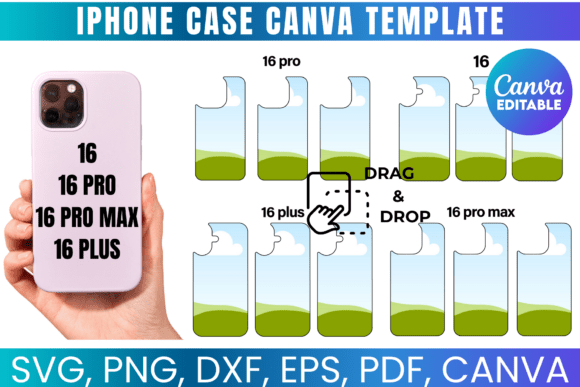
What truly sets this iPhone case Canva template apart is its comprehensive coverage. It's not a one-size-fits-all solution. The package includes specific templates for the iPhone 16, iPhone 16 Pro, and the larger iPhone 16 Pro Max. This attention to detail is critical. A design that fits the Pro model perfectly will have misaligned camera cutouts or button placements on the Pro Max. By providing separate, accurately sized templates for each model, the creator ensures your final printed case looks intentional and professionally crafted, not like an afterthought.
The visual characteristics of the template itself are clean and functional. It presents a clear, layered workspace within Canva. You'll see the outline of the specific phone model, including precise guides for the camera module, side buttons, and charging port. This isn't a decorative element; it's your production blueprint. The personality is one of a utility-focused design asset—a reliable foundation that lets your creativity be the star. The overall appeal is its professional-grade accuracy paired with the universally friendly Canva interface.
From Digital Canvas to Physical Product: The Sublimation Workflow
This template shines brightest in the realm of sublimation printing. Sublimation requires a specific process: you print a mirror image of your design onto special paper, then use a heat press to transfer the ink onto a polyester-coated blank, in this case, an iPhone case. The template's inclusion of SVG, PNG, DXF, and PDF files means it's ready for this entire workflow. The PNG with a transparent background is perfect for layering your artwork in Canva or Photoshop before printing. The SVG and DXF files are invaluable for Cricut or Silhouette users who might want to create precise masks or overlays for multi-step designs.
Imagine a small business owner selling custom cases at a local market. They can use this template to quickly mock up designs for different customers, incorporating names, monograms, or favorite quotes. A graphic designer can use it to create a portfolio piece showcasing their brand identity work applied to a tangible product. The template acts as the crucial bridge between a flat digital concept and a three-dimensional, usable item. The included measurements are your best friend here, allowing you to verify that text and key graphics fall within the "safe area" and won't be awkwardly cropped by the case's curved edges.
Practical Guidance for Choosing and Using Your Template
Evaluating this template for your project involves a few practical considerations. First, assess your technical comfort. While Canva is user-friendly, successfully using this for sublimation does require basic knowledge of your specific heat press settings and printer calibration. The template solves the design and sizing problem, but production is your domain.
When it comes to font pairing and visual hierarchy within your case design, think about the end product's scale. A phone case is a small canvas. A single, bold display font might work for a monogram or a short, impactful word. However, trying to cram a full address or a long, cursive script font onto the back of a phone will likely result in illegibility. Sans serif fonts often work best for smaller text due to their clarity. Use the Canva template to test your design on the actual phone outline—zoom in and check readability at a realistic size. This is where you prevent costly printing mistakes.
Remember the terms of use: this is for creating physical products you can sell, but you cannot resell the digital template files themselves. This model supports makers and small businesses. You're investing in a design tool that enables a product line, not just a single item. The lifetime access means as you grow your business or hobby, you can revisit the template for new designs without additional cost.
Where This Template Fits in Your Creative Toolkit
Think of this iPhone case Canva template as a specialized piece of your broader design asset library. It's not a replacement for a full branding suite or a comprehensive font collection, but it's an incredibly powerful niche tool. It's perfect for:
- E-commerce Entrepreneurs: Quickly prototype and produce custom cases for a print-on-demand store or local sales.
- Marketers & Brand Strategists: Create branded merchandise for events, client gifts, or team swag that looks polished and professional.
- Content Creators & Bloggers: Design unique, on-brand phone cases as merchandise for your audience or as stylish props for your content.
- Crafters & Hobbyists: Make personalized, thoughtful gifts for friends and family without needing to master complex vector software.
Its strength is in its focused application. It doesn't try to be everything; it excels at solving one specific problem with high accuracy and user accessibility. In a world of generic, mass-produced accessories, the ability to easily create something custom and meaningful holds real value. This template provides the practical means to do exactly that, turning your creative ideas into a product people can hold in their hands. It’s a testament to how modern design tools are democratizing creation, putting professional-level production capabilities into the hands of anyone with a good idea and a Canva account.