Cookbook Template | Recipe Book Canva
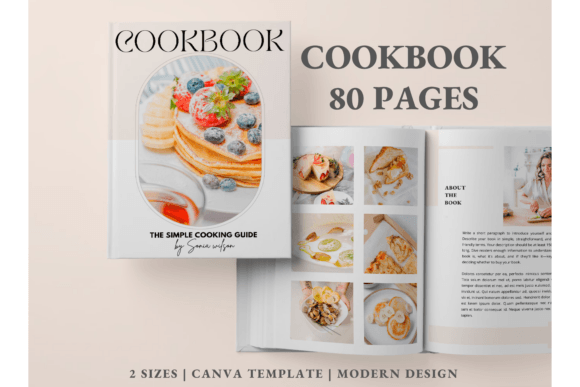
There's a particular kind of magic in holding a cookbook that feels both personal and polished. The cover draws you in, the layout guides your eyes effortlessly from ingredient list to final flourish, and every page feels intentional. If you've ever dreamed of creating your own recipe book but felt overwhelmed by design software or layout decisions, the Cookbook Template | Recipe Book Canva offers a surprisingly elegant solution. This isn't just a collection of placeholder pages—it's a fully realized 80-page framework built for people who want to publish something beautiful without starting from a blank canvas.
What Makes This Template Stand Out
At first glance, the Cookbook Template | Recipe Book Canva presents a clean, modern aesthetic. The design leans into generous white space, balanced typography, and a visual rhythm that feels contemporary without being cold. It's the kind of template that lets your food photography breathe while still maintaining a cohesive editorial feel across every spread. The visual personality strikes a balance between approachable and professional—think weekend farmers' market meets boutique publishing house.
What's immediately practical is the sheer scope of what's included. You're not just getting recipe pages. The template ships with 10 book covers, giving you real flexibility to test different visual directions before committing. There are 5 chapter covers for organizing sections by cuisine, meal type, or however you see fit. Beyond the 48 recipe layouts, you'll find article pages for storytelling, a cooking tip page, a meal planner, a grocery list, and even a "Connect with Us" page for anyone building a brand around their culinary content. That kind of range matters when you're thinking about this as more than a personal project—when it becomes a design asset for a blog, a small business, or a self-published title.
Who Benefits Most from This Recipe Book Template
The audience for a template like this is broader than you might initially think. Food bloggers looking to compile their best recipes into a downloadable PDF or print-on-demand book will find the structure saves weeks of layout work. Entrepreneurs in the food space—whether you're selling spice blends, running a meal prep service, or launching a cooking class—can use this as a brand identity touchpoint. The "About Me" and "About the Book" pages are particularly useful here, giving you structured space to tell your story without fumbling with formatting.
Small business owners and content creators who already understand the value of editorial design will appreciate how the template handles visual hierarchy. Each recipe page is designed so the title commands attention, the ingredient list is scannable, and the instructions flow naturally. That's not accidental—it's the kind of thoughtful layout work that usually requires either a skilled designer or significant time investment. For crafters and hobbyists who simply want to preserve family recipes in a format worthy of passing down, the template removes the technical barrier entirely.
Design Flexibility Inside Canva
One of the strongest arguments for the Cookbook Template | Recipe Book Canva is how much control you actually retain. Because it lives inside Canva, you can edit virtually every element without needing Adobe Illustrator or InDesign expertise. Text is fully customizable—change the font, adjust sizing, swap colors, and modify styles to match your vision. If the default typeface pairing doesn't suit your aesthetic, you can experiment with different serif fonts for headings and sans serif fonts for body text until the combination feels right.
Images are equally flexible. Upload your own photography, resize and reposition it, and even apply Canva's built-in filters for consistency across your pages. Backgrounds can be swapped—solid colors, subtle patterns, or your own imagery. The template includes graphic elements like shapes, lines, and icons that you can move, recolor, or remove entirely. This level of customization means the same 80-page template can produce dramatically different finished products depending on who's editing it.
The A4 page size (210×297 mm) is a practical choice that works well for both digital distribution and standard print formats. Whether you're creating a PDF for email subscribers or ordering physical copies through a print service, the dimensions translate cleanly. And because a free Canva account is all you need to access and edit the template, the barrier to entry is essentially zero.
Practical Tips for Getting the Most Out of It
Before diving in, spend some time with the table of contents page. It's tempting to jump straight into recipe layouts, but mapping out your content structure first will save you from reorganizing later. Think about how your chapters flow—does it make more sense to organize by meal type, season, or difficulty level? The five chapter covers give you room to create meaningful sections, so use them intentionally.
When it comes to font pairing, resist the urge to introduce too many typefaces. A strong cookbook design typically works with two, maybe three, fonts maximum. Use a display font or handwritten font for chapter titles and recipe names if you want personality, but keep ingredient lists and instructions in a clean, highly readable typeface. Readability is non-negotiable in a recipe book—someone standing in a kitchen with flour on their hands needs to read your instructions at a glance.
For those considering this as a commercial font and template project—meaning you intend to sell the finished cookbook—review Canva's licensing terms carefully. The template itself is designed for this kind of use, but the fonts and graphic elements available within Canva have their own usage guidelines. If you're building a brand identity around a food business, consistency matters. Use the same color palette, typography choices, and visual style across your cookbook, social media graphics, web design, and even packaging design if applicable.
Test your final design on multiple devices before committing. A layout that looks balanced on a desktop screen might feel cramped on a phone. If you're distributing digitally, check that text remains legible at smaller sizes. For print, order a single proof copy before committing to a larger run. The investment in a test print is minimal compared to discovering a color issue or layout problem after printing fifty copies.
Why This Template Works for Real Projects
The Cookbook Template | Recipe Book Canva succeeds because it treats recipe book design as a real publishing challenge rather than a simple document exercise. The inclusion of meal planners, grocery lists, and article pages acknowledges that modern cookbooks are often lifestyle documents, not just collections of instructions. The cooking tip page and "Anything Else" page give you room to add personality—maybe a note about your grandmother's kitchen or a guide to essential pantry staples.
For anyone who has spent hours wrestling with page layouts in word processors, this template represents a genuine shortcut that doesn't sacrifice quality. The design is modern, the structure is thoughtful, and the customization options are extensive enough to make the final product feel genuinely yours. Whether you're creating a gift for family, building a lead magnet for your food blog, or self-publishing your first cookbook, this template gives you a professional foundation to build on—and that's worth considerably more than the time you'd spend starting from scratch.